Mitratech LegalHold: Every Feature, Explained
Here's What's Actually Inside Mitratech LegalHold
Every feature below is built around one of three roles (Hold Admins, Legal, and IT Admins), so nothing here is generic.
Compliance rate
Steps to create and send a hold
Co-innovation customers
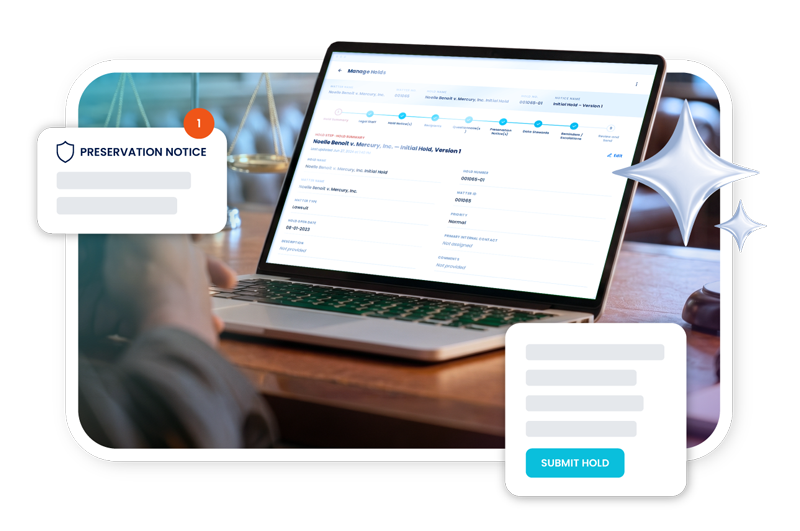
Mitratech LegalHold is the system behind the process: notice creation, custodian tracking, Microsoft 365 preservation, and audit-ready reporting, all in one platform. This page covers exactly what each part does. For the case on why to automate legal hold in the first place, see the Legal Hold Solutions overview.
- Automated notice creation, delivery, and tracking
- Microsoft 365, OneDrive, and Teams preservation via Purview
- Manager Portal with Staff Compliance visibility
- Full questionnaire and audit history with timestamps
- Bulk CSV site management for IT Admins
- TeamConnect integration for matter-linked holds
- Nine standard reports plus a custom report designer
“We put our information into TeamConnect… and then that information flows very seamlessly through the legal hold module and then ultimately through reporting.”
“It makes sure you don’t skip steps. It makes sure you’re consistent with what you do.”
“More efficient, more trackable, more reportable; that’s really something that interests our stakeholders.”
LegalHold + TeamConnect
A direct integration with TeamConnect allows LegalHold users to:
- Veranlassen Sie rechtliche Schritte direkt aus TeamConnect heraus
- View and report on legal hold data and compliance rates using TeamConnect’s reporting tools
- Automatically update LegalHold if a matter’s scope changes
- Integrieren Sie mit Single Sign-On (SSO)
- Automatically populate legal hold notifications with custom fields from TeamConnect
- Send matter-based security settings from TeamConnect to LegalHold, ensuring private-matter security is preserved between systems
When a matter is created in TeamConnect, its name, matter ID, description, legal staff, and custom fields populate a new hold automatically; no re-entry required. Legal staff assignments sync from TeamConnect, so the same people managing the matter appear as legal staff on the hold.
Each TeamConnect matter gets a dedicated LegalHold tab showing real-time hold status, custodian response counts, and compliance state. Security and permissions are enforced consistently across both platforms; a user’s TeamConnect matter-level access governs what they can see and do in the associated hold.
Berichte und Analysen
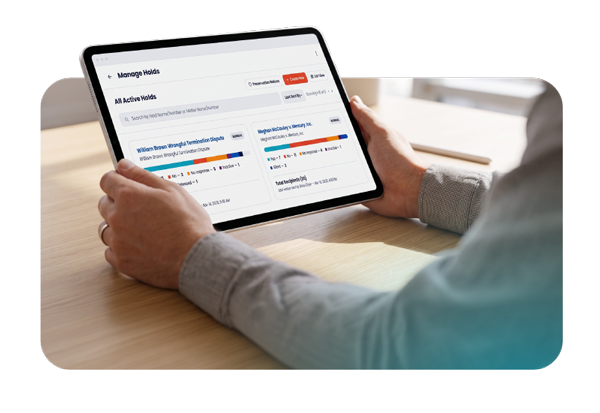
LegalHold includes nine standard, system-generated reports, exportable to PDF or CSV. For anything the standard reports don’t cover, the custom report designer lets you choose fields, apply filters, and schedule automatic distribution, including delivery by FTP to a downstream system.
Compliance insights, not just raw data
Beyond individual hold status, LegalHold’s reporting surfaces organization-wide compliance trends, including:
- Which matter types generate the most legal holds
- Which jurisdictions have the highest hold volume
- Which attorneys are managing the most holds
- Welche Rechtsansprüche haben die niedrigsten Befolgungsquoten?
- Overall compliance trends over time
LegalHold 4.4: Feature-by-Feature
Manager Portal & Staff Compliance
Hold Admins configure automated notifications to managers when direct reports are placed on active holds — with configurable scheduling, consolidated delivery (one notification per manager, not one per event), and admin control over templates. Notifications trigger only on initial assignment or meaningful changes — new custodian, new hold, or status update — cutting duplicate emails.
The Staff Compliance tab shows managers one row per active hold per direct report: staff name, email, hold number, matter number, and response status by default, with more fields available via customization. An empty-state message displays when no direct reports have active holds.
Questionnaire Response History
Every questionnaire response, reset, and resubmission is retained with a full timestamp, viewable in the Questionnaire History tab in both the Custodian Portal and Hold Admin (Manage Holds) view. Notification logic was also optimized so questionnaire responses route to the active notice sender, with optional inclusion of Primary and Secondary Internal Contacts.
Parent-Level Lock Enforcement
LegalHold automatically locks and preserves all sub-components of a data source — Private Channels, Shared Channels, and Sub-sites — closing a gap where sub-component data could previously bypass system-level preservation policies.
Purview & OneDrive Integration
- Auto-creates OneDrive data sources using the stored web URL when custodians and data sources are added to a hold
- Applies holds to OneDrive sites for inactive (soft-deleted) Azure users using that same URL
- Falls back to creating the OneDrive source from the custodian’s email when the URL field is unavailable
- Sync All now runs asynchronously with controlled batching, reducing wait times and fully resyncing any custodian stuck in ERROR status
Hold Review and Send Screen
Displays Microsoft 365 errors before a hold is issued, giving admins early visibility into custodian sync or data source initialization problems — preventing incomplete holds before they go out.
In-Place Preservation Variable Refactor
Preservation date handling now uses a single dynamic variable that correctly resolves the applicable boundary based on the selected operator (Before, After, or Range) — eliminating missing values in templates using Preservation End Date with “Before” holds.
Bulk Non-Custodial Data Site Upload
Administrators upload and manage large SharePoint/site lists via CSV instead of entering them one at a time.
HR Feed Process Improvements
Optional boolean toggles let admins independently disable non-respondent reminder emails, SSO, and manager escalation emails. These fields generate audit records, are available via API, and appear in the updated People module data dictionary — with backward compatibility for existing HR file versions.
Workflow Automation (TAP) Integration
Administrators configure and validate TAP connections directly in LegalHold, manage workflow templates, and automatically trigger TAP processes when an employee becomes inactive — ensuring legal holds stay enforced during offboarding without manual intervention.

"The great thing about Mitratech is, they listen to what we say, and through our suggestions they develop more software to help our company be more successful and profitable."
Mitratech LegalHold by Role
For Hold Admins
Create a hold from the tile-menu dashboard. If integrated with TeamConnect, matter data — name, ID, description, legal staff — populates automatically. Issue notices using pre-approved templates, track responses in real time (yes/no/silent/non-responsive), and generate one of nine standard reports or build a custom one on a recurring schedule.

Häufig gestellte Fragen
How many reports does LegalHold include?
Nine standard, system-generated reports, plus a custom report designer for building your own.
Can LegalHold send emails through our own mail servers?
Yes. LegalHold can send notifications via its own SMTP, or route them through your organization’s email servers so messages appear to come from your domain — reducing the risk of spam filtering.
Does LegalHold have an API?
Yes, a full bi-directional API — used both to feed data into LegalHold (e.g., HR/custodian data) and to pull data out to other systems like e-discovery platforms or BI tools.
What HR systems does LegalHold integrate with?
Workday and PeopleSoft are the most common; Active Directory is also widely used to source custodian and user lists.

©2026 Mitratech, Inc. Alle Rechte vorbehalten.

©2026 Mitratech, Inc. Alle Rechte vorbehalten.