Document generation is what happens when a business stops drafting documents by hand and starts producing them from intelligent templates instead. It sounds simple, but for any organization creating high volumes of contracts, agreements, forms, or reports, the operational difference is significant. With that in mind, let’s dive into what document generation means, how the software works, and what separates a basic template tool from an enterprise-grade document generation system.
What is Document Generation? A Direct Answer
Document generation (sometimes called document creation or document assembly) is the process of automatically producing complete, accurate business documents from pre-built templates. Instead of drafting from scratch, users provide structured inputs through a guided questionnaire, and the system assembles the finished document by populating variable fields with the right data.
In practice, the core components of document generation are:
- Templates — master documents with fixed standard content and variable fields marked for population
- Data inputs — information provided by the user or pulled automatically from connected systems
- Assembly logic — rules that determine which clauses, sections, or language appear based on the inputs given
- Output — a complete, formatted, ready-to-use document
What Does Document Generation Mean in Practice?
Think about a contract. A standard NDA has sections that are always the same (confidentiality obligations, governing law, term) and sections that change with every deal: the parties, the effective date, the specific scope of what’s confidential.
Document generation software handles this by locking the standard sections inside an approved template and turning the variable sections into guided questions. When someone needs an NDA, they answer those questions — who are the parties, what’s the term, what jurisdiction — and the system produces a finished, formatted document in minutes.
The result is consistent every time. The right language is used. The right clauses appear. Nothing gets missed and nothing gets changed that shouldn’t be.
This is what document generation means in operational terms: removing the manual drafting step from document creation without removing the human judgment that goes into designing what the document should say.
Document Generation vs. Document Automation: What’s the Difference?
These terms are often used interchangeably, and for good reason. They describe closely related things. But there is a useful distinction.
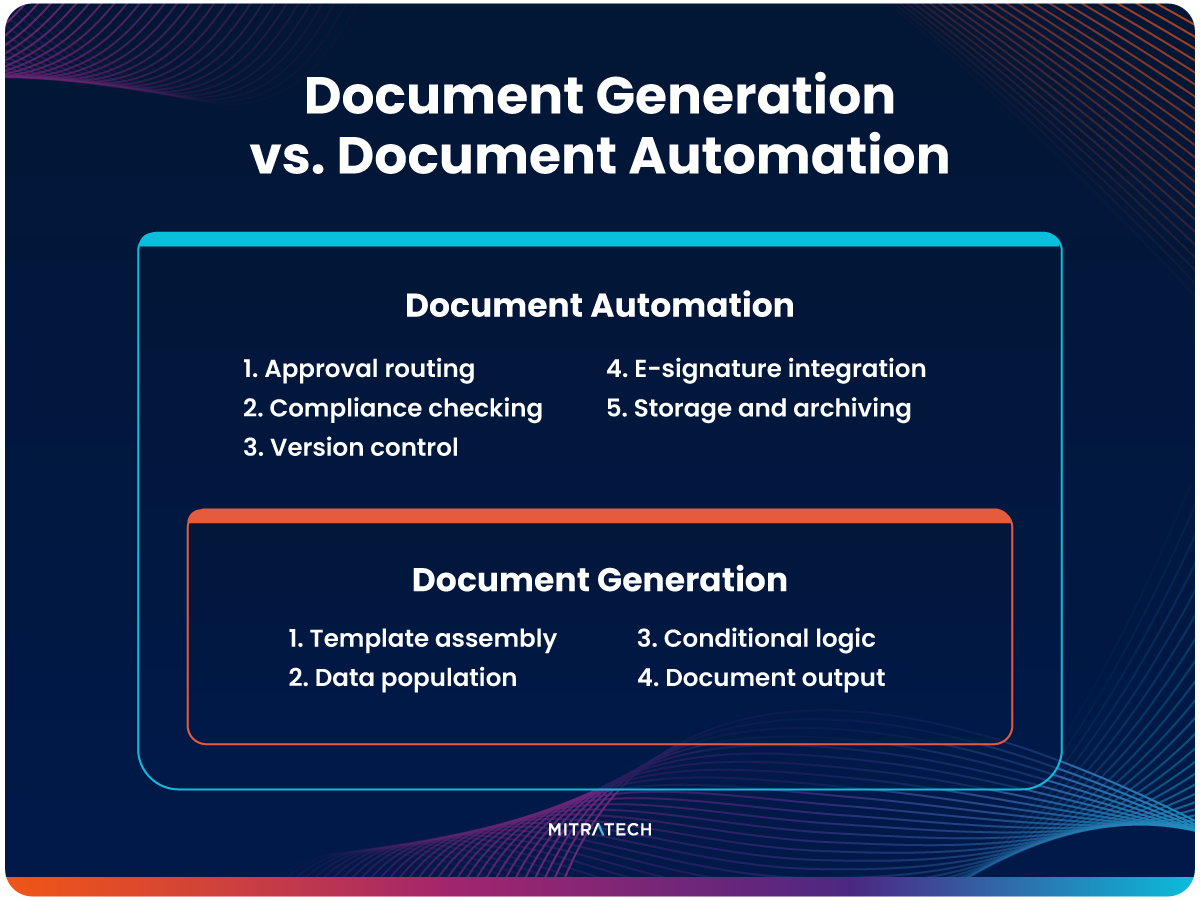
Document generation refers specifically to the assembly process: taking a template and producing a finished document from it.
Document automation is the broader discipline that encompasses document generation plus the surrounding workflow: approval routing, compliance checking, version control, e-signature integration, and storage back into a matter management or document management system.
In practice, most enterprise document generation systems — including Mitratech HotDocs — deliver both. The generation capability produces the document. The automation layer moves it through the rest of its lifecycle without manual intervention.
If you’re evaluating platforms, it’s worth asking whether you need generation alone or the full automation workflow. For most organizations beyond a certain volume, the workflow layer is where the additional ROI comes from. See document automation software for a full overview of what the automation layer covers.
How Document Generation Software Works: Step by Step
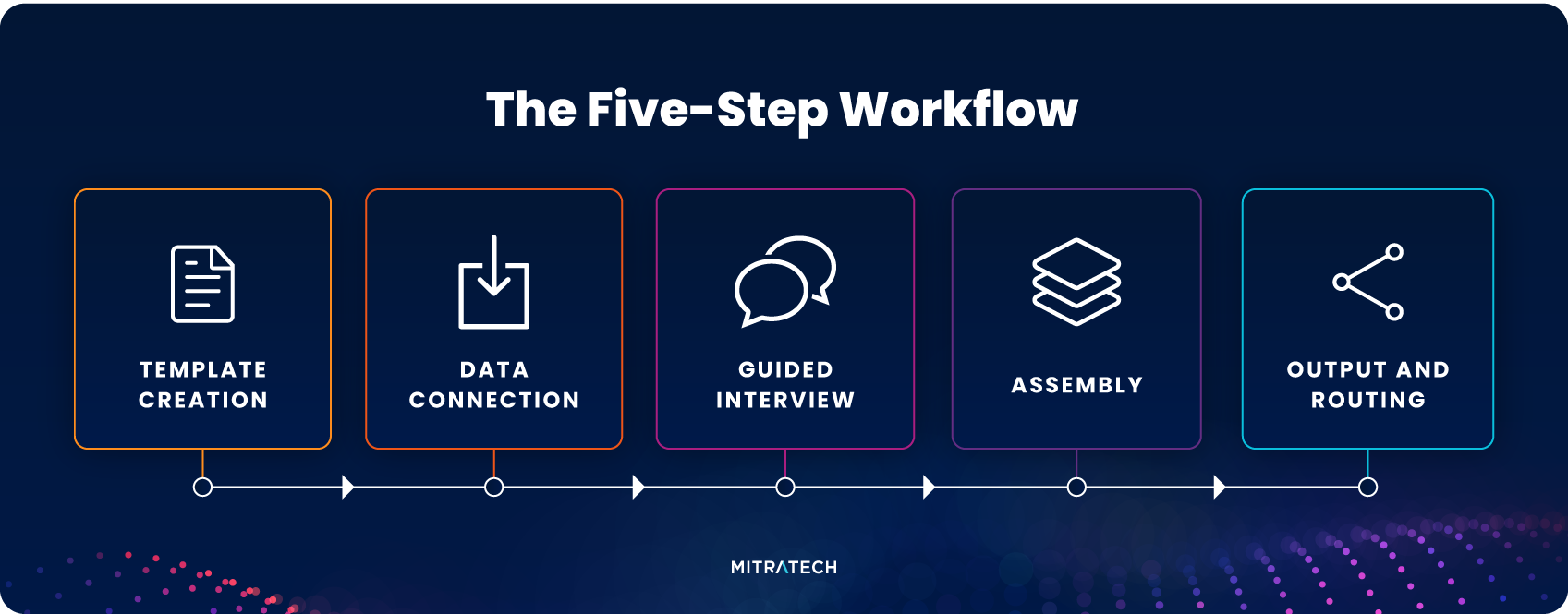
Understanding the mechanics helps when evaluating platforms. Here’s how a document generation system typically works end-to-end.
| Step | What Happens |
|---|---|
| 1. Template creation | A subject matter expert builds a master template, marking variable fields and writing the conditional logic that determines which clauses appear in which scenarios |
| 2. Data connection | The template is connected to data sources — a matter management system, CRM, HR platform, or structured intake form — so variable fields auto-populate without manual entry |
| 3. Guided interview | When a document is needed, the user completes a guided questionnaire. The system asks only the questions relevant to their specific scenario |
| 4. Assembly | The system applies conditional logic, populates variable fields from the data inputs, and assembles the complete document |
| 5. Output and routing | The finished document is generated in the required format, then routed for approval, e-signature, or storage — automatically, based on pre-configured rules |
The sophistication of step 1 — template design — is often what separates basic document generation tools from enterprise-grade document generation systems. Complex documents with multiple conditional branches, jurisdiction-specific clauses, and multi-party variables require a platform capable of handling that logic reliably at scale.
What Types of Documents Can Be Generated?
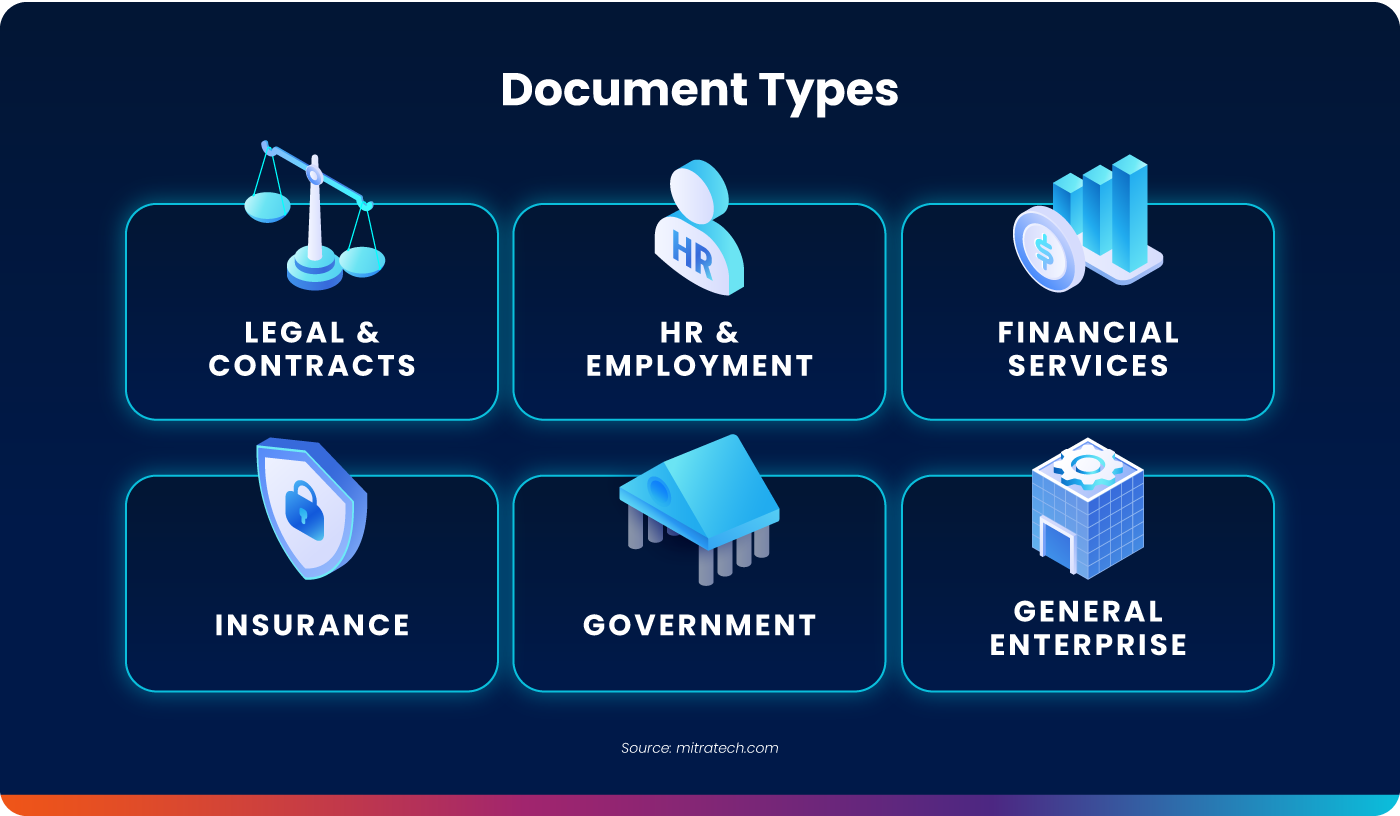
Document generation software works across any high-volume, repeatable document type. Common categories include:
- Legal and contracts Contracts, NDAs, MSAs, engagement letters, loan and security documents, court filings, wills, trusts, and estate planning documents.
- HR and employment Offer letters, employment agreements, onboarding documents, policy acknowledgments, and performance documentation.
- Financial services Loan agreements, account opening documents, compliance disclosures, and customer correspondence.
- Insurance Policy documents, claims correspondence, compliance forms, and customer notices.
- Government and public sector Regulatory filings, citizen correspondence, procurement documents, and internal policy documents.
The common thread is volume and repetition. If your organization produces the same document type dozens, hundreds, or thousands of times — with variations by party, jurisdiction, value, or scenario — that document is a candidate for generation.
What is a Document Generation System?
A document generation system is the complete platform that manages templates, data connections, assembly logic, and output, as opposed to a standalone template or a basic mail merge tool.
The distinction matters because a system manages the full lifecycle: who can create and edit templates, what version of a template is current, where generated documents are stored, and what the audit trail looks like. A basic tool generates a document. A system governs the entire process.
Enterprise document generation systems typically include:
- Template management — centralized storage, version control, and access controls for master templates
- No-code or low-code authoring — allowing subject matter experts rather than developers to build and maintain templates
- Integration capabilities — connecting to existing data sources so variable fields auto-populate without re-entry
- Conditional logic — rules that determine document content based on input values
- Audit trail — a record of who generated what document, when, and with what inputs
- Output format control — producing documents in Word, PDF, or other required formats
Mitratech HotDocs is one of only three Tier 1-rated document generation and automation platforms according to LegalTech Hub — a designation that recognizes robust feature sets, product maturity, and proven market stability. It has been trusted for 30+ years across legal, financial services, insurance, government, and enterprise organizations worldwide.
Who Uses Document Generation Software?
Document generation software is used by any organization that produces high volumes of documents with variable content.
Law firms generate client-facing contracts, NDAs, court filings, wills, and matter-specific documents. For law firms, time is billable — every hour saved on drafting is an hour recovered for client work. See document generation software for law firms.
Corporate and in-house legal teams generate internal contracts, NDA self-service portals for sales teams, MSAs, vendor agreements, HR documents, and compliance materials. See document generation software for in-house legal teams.
Financial services organizations, including banks, lenders, and insurance companies — generate loan documents, policy documents, account correspondence, and regulatory filings at scale. Mitratech HotDocs is used by leading global financial institutions to generate complex loan and security documents internally, with greater consistency and speed than traditional outsourcing.
Government and public sector organizations generate citizen correspondence, regulatory documents, procurement materials, and internal policy documentation.
HR teams generate offer letters, onboarding documents, employment agreements, and policy acknowledgments across large, distributed workforces.
What Are the Benefits?
The benefits fall into four categories, each measurable in different ways.
- Speed. Mitratech HotDocs delivers 90% faster document creation compared to manual drafting. Documents that previously took hours to produce are generated in minutes.
- Accuracy and consistency. When documents are generated from approved templates with locked standard content, every output follows the same standards. Variable fields are populated from structured data rather than manual copy-paste, eliminating transcription errors.
- Compliance. Template-based generation enforces compliance by design. Approved language is locked. Business rules determine which clauses apply to which scenarios. Users can only generate documents that conform to current standards.
- Scalability. Manual document drafting scales linearly with headcount: more documents means more people. Document generation breaks that relationship. Organizations increase document output without proportional increases in staff time.
Document Generation Software vs. Word Processing: Why Templates Alone Aren’t Enough
A common misconception is that document generation software is just a better version of Word templates. It isn’t.
Word templates are static. They require manual editing for every variable, rely on the user to apply the right version, offer no conditional logic, and produce no audit trail. Every user can — and does — modify the underlying template, creating version drift and compliance risk.
Document generation software is dynamic. Templates are centralized and version-controlled. Users complete guided questionnaires rather than editing documents directly. Conditional logic applies automatically. The output is locked to the approved template. Every generation event is logged.
The practical difference: a Word template is a starting point that requires human judgment and manual effort to complete. A document generation system is a governed process that produces a finished, compliant document with minimal human intervention in the drafting step.